



Automatic Reports for Agencies: Reporting That Sends Itself
Start of the month, same ritual all over again: pull screenshots from four tools, copy numbers into slides, format everything, export a PDF, and send it to each client individually. With five clients, that's half a day; with fifteen, it's a full workday every month. And that one typo in the numbers is guaranteed to surface only when the client asks about it.
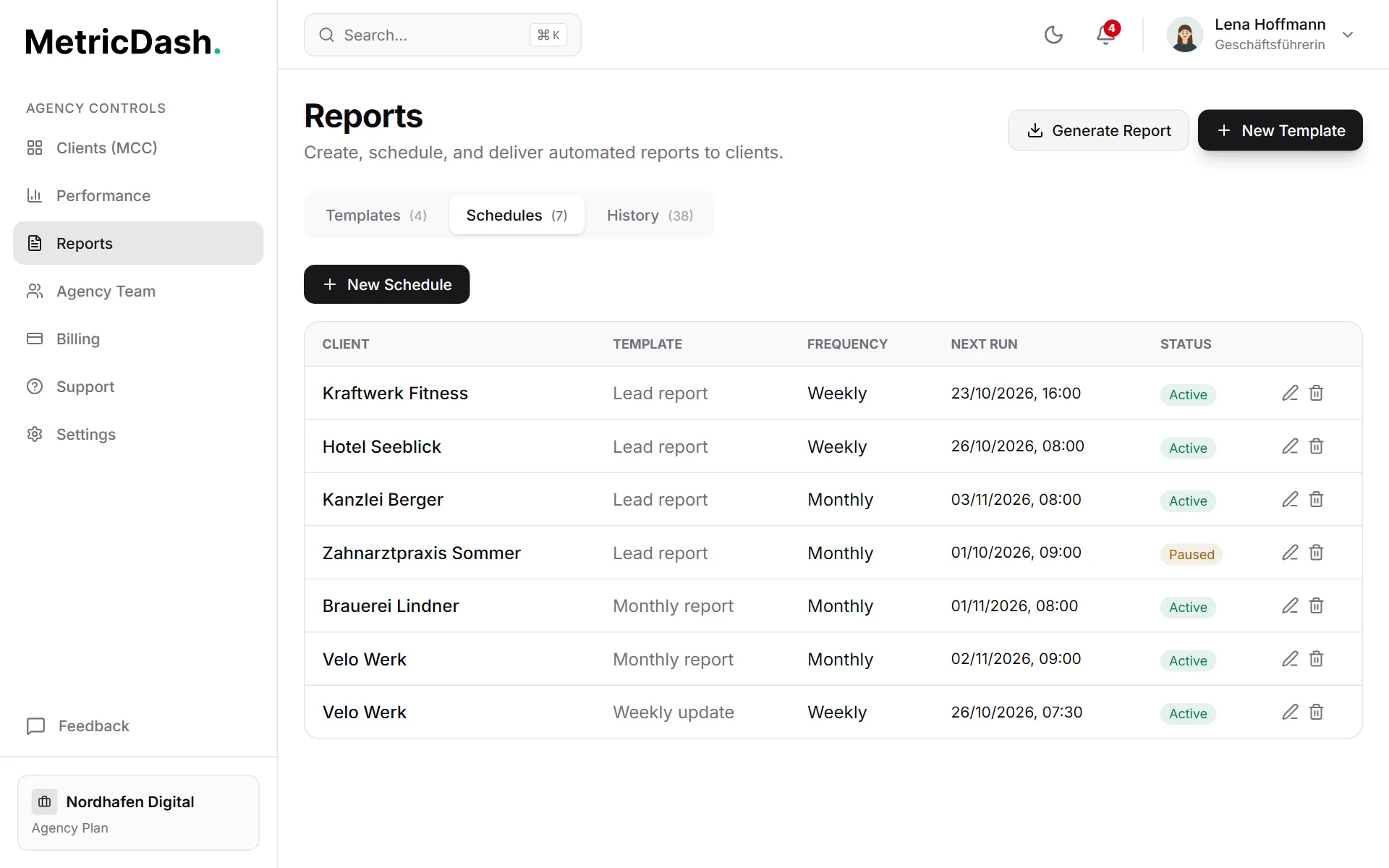
MetricDash builds your client reports automatically: assemble a template once from nine section types, set a daily, weekly or monthly schedule, and from then on the finished report lands right on time in your recipients' inboxes. The numbers come from Google Ads, Meta Ads, Microsoft Advertising, Google Search Console, and your website analytics tool, and the shareable report page carries your agency logo.
For anyone who'd rather skip the attachment, there are shareable report links: a frozen data snapshot, valid for 30 days, accessible without a login. Perfect for when your client forwards the report internally to leadership or their team.
What this feature does
Templates built from 9 building blocks
Build your reports freely from nine section types: core KPIs, spend trend, platform comparison, campaign table, organic search (GSC), website traffic, lead summary, lead list, and goal progress. Every client gets exactly the sections that matter to them: the campaign table for a performance client, organic search for an SEO client. Build the template once, and it runs again every report cycle.
Schedules that just work
Daily, weekly or monthly, with a time and, where it applies, a day of the week or month you choose freely. Schedules are timezone-safe: not even the daylight saving switch will shift your Monday-8-a.m. report. And if a client's on pause, you simply pause the schedule right along with them.
Email delivery to any recipient
Add as many recipients as you like: the client themselves, their team, your own account lead. MetricDash sends the finished report automatically at the scheduled time. Anyone who's unsubscribed from notifications is respected and won't be emailed again.
Shareable links, no login required
Every report can be shared as a link: a frozen data snapshot whose numbers never change afterward, valid for 30 days, accessible without a login. Your client forwards the link internally to leadership or colleagues without anyone needing an account. And you'll never again argue about numbers that supposedly changed since you sent them.
Comparison with the previous period
Next to every value, core KPIs, leads, and website traffic show the change against the equally long period right before. If a source has no figures for that period or it lies outside your plan's data history, the report leaves the change out instead of showing a skewed number.
Upfront when a source is missing
If a connected data source could not be loaded when the report was generated, for example because access expired, a notice at the top of the report names that source. Your client sees right away that its numbers are missing instead of wondering about lower totals.
Your comment on the report
When you create a report manually, you can add a few lines for your client, such as context for the numbers or the next steps. The comment appears at the top of the report and in the email you send the report with.
On-demand reports for any date range
Client calls and wants numbers for the quarter? Create a manual report with any date range you choose, any time. No need to wait for the next scheduled send. Same templates, same branding, delivered to the client in minutes.
Your logo, your brand
The shareable report pages carry your agency's branding: your logo appears on every report page your clients and their stakeholders open through the link. The report looks like your work, because it is.
How it works
- 1Assemble a templateChoose what belongs in the report from the nine section types, from core KPIs to website traffic to goal progress. One fitting template per client.
- 2Set the scheduleDaily, weekly or monthly, with the time and day of your choice. Timezone-safe, even across the daylight saving switch.
- 3Add recipientsClient, client team, your own colleagues: any number of email addresses. Unsubscribed recipients are automatically excluded.
- 4The rest runs on its ownMetricDash creates and sends the report right on schedule. In between, create manual reports with any date range whenever you need to, or share a report link with no login required.
FAQ
Which data sources feed into the reports?
Google Ads (including MCC), Meta Ads, Microsoft Advertising, and Google Search Console, plus your leads and one website analytics tool. These sources feed the report sections, like platform comparison, the campaign table, organic search, or website traffic. For the website numbers, the report uses the first connected tool per client in this order: GA4, Rybbit, Plausible, Umami, Matomo, Pirsch, Fathom.
Can the numbers in a shared report change afterward?
No. A report link is a frozen data snapshot: the numbers stay exactly as they were when the report was created. The link is valid for 30 days and accessible without a login. You and your client are guaranteed to be looking at the same figures.
Do my clients need a MetricDash account to see reports?
No. Email delivery reaches any recipient, and report links work completely without a login, even for your client's stakeholders who've never seen MetricDash.
Can I create reports outside the schedule too?
Yes. You can create manual reports on demand at any time, with any date range you choose, for a quarterly review, say, or a spontaneous client request. You can also pause scheduled reports anytime and reactivate them later.
What do automatic reports cost?
Automatic, scheduled reports are part of the Agency plan: starting at €99 with three client accounts included (then €29 per account, dropping to €19 from the eleventh onward). On the Free plan, you create reports manually and share them via link. You always pay per client, never per data source. And we're currently in open alpha, so everything is free right now, scheduling included, no credit card required.
Related topics
Try MetricDash for free
Currently in open alpha: every feature free, connect unlimited clients, no credit card required.
Start for free →